Is It Safe to Have a TV That Hangs Over a Stand? Key Considerations for 2025

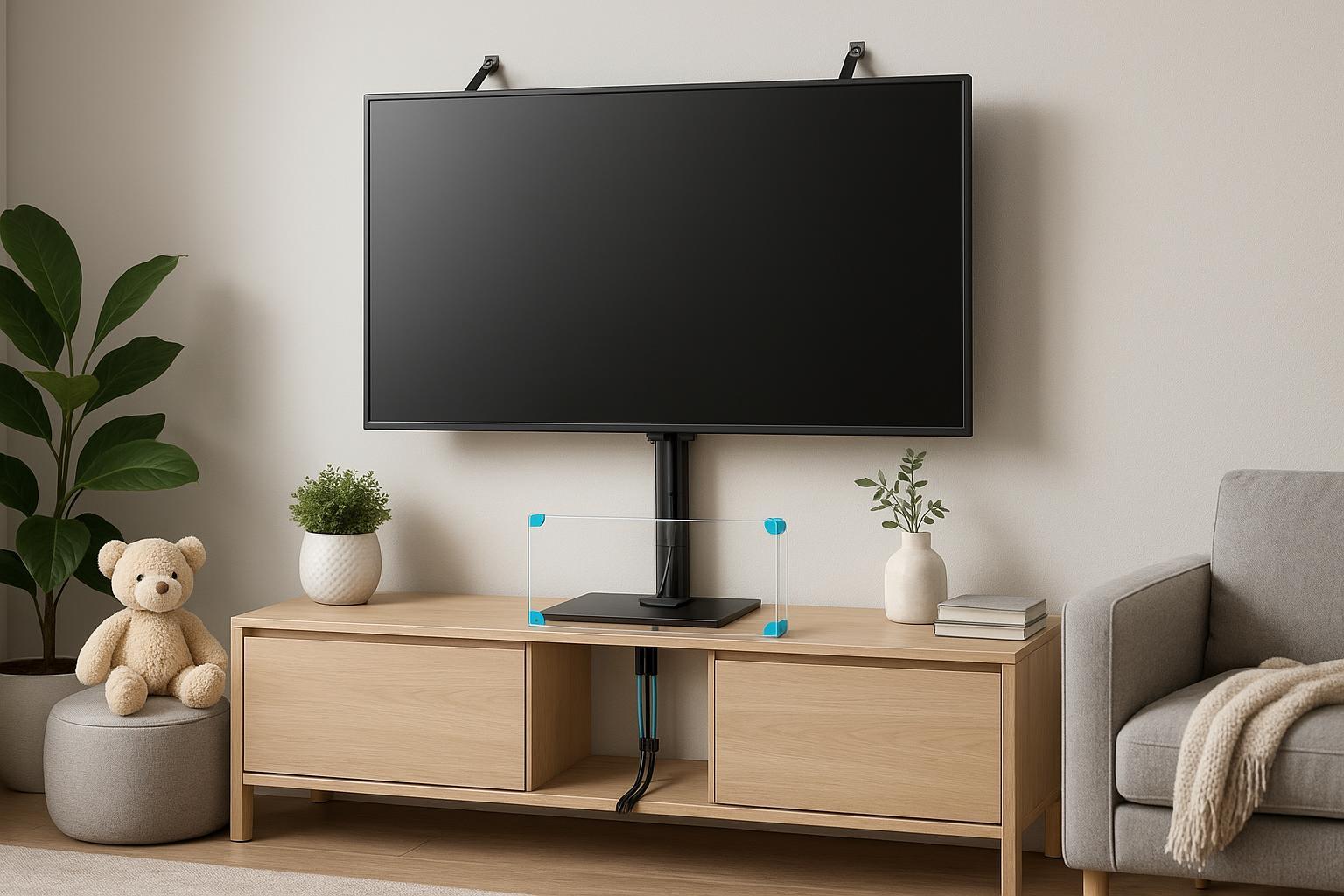
Introduction: The Safety Truth About Hanging a TV Over a Stand
Hanging your TV above a stand can be sleek, space-saving, and visually impressive—but only if it’s done right. Each year, more than 17,800 emergency visits in the U.S. are linked to TV and furniture tip-overs, with children and pets at greatest risk (CPSC). In 2025, updated ANSI/UL and CPSC standards make safe installation, sturdy equipment, and preventative accessories more critical than ever.
This guide breaks down how to hang your TV safely over a stand—step by step. I’ll walk you through the right preparation, mounting techniques, essential safety gear, design tips, and new options for renters. Wherever applicable, I’ll share how custom acrylic accessories from TOYIN Acrylic Products Co., Ltd. enhance both safety and style.
Difficulty: Intermediate (some DIY experience helpful)
Time Required: About 40–90 minutes
Best For: Homeowners, families, renters, designers, and DIY enthusiasts
Step 1: Prep & Planning — Assess TV, Stand, & Space Compatibility
1. Check the Stand: Size, Stability & Load
- Width: The stand should be at least 3" wider than your TV. A slight overhang (1–2") is safe, but never allow more than 2–3"; excessive overhang increases tip risk (Rustic Social).
- Weight Capacity: Confirm the stand supports your TV's weight plus accessories. If unsure, check with the manufacturer or use a stand designed for oversized TVs.
- Stability: Wide, flat tops and sturdy materials (solid wood, quality acrylic, metal) outperform lightweight or uneven surfaces.
2. Pick a Safe Location
- Avoid placing your TV in high-traffic zones, near doors/hallways, or anywhere a child or pet might bump or pull it.
- Keep away from direct sunlight to reduce screen glare and damage.
3. Read the Manuals—TV, Stand & Mount
- Review manufacturer instructions for your TV, stand, and mounting kit. Look for VESA standards and any specific notes on weight/load ratings.
- Double-check compatibility, especially if using a custom or third-party mount.
Step 2: Gather the Right Tools & Safety Gear
Before you begin, have these essentials ready:
- Stud finder (for wall-mounting)
- Spirit level & tape measure
- Power drill (+ drill bits)
- Screwdriver set / socket wrench
- Safety goggles & gloves
- Proper mounting kit (VESA-compliant, load-rated for your TV)
- Anti-tip safety straps/anchors (Walmart)
- Cable management accessories (clips, sleeves, or acrylic organizers from TOYIN)
- Optional: Custom acrylic safety cover or barrier (for homes with kids or pets)
Tip: If you’re a renter, look into non-drill mounting solutions or adhesive cable organizers for minimal wall damage (Pillar Mount).
Step 3: Step-by-Step Safe Mounting Procedure
1. Locate Wall Studs (If Wall Mounting Above the Stand)
- Use your stud finder to identify secure mounting points. Mounting only to drywall is dangerous.
- Mark drill points with a pencil; double-check with spirit level.
2. Attach the Mounting Bracket to the Wall
- Drill pilot holes into the studs. Wear safety goggles.
- Secure the bracket using manufacturer-approved bolts.
- Inspect bracket stability by gently pulling/tugging before proceeding.
3. Attach Bracket to the TV
- Connect the appropriate VESA plate to your TV using the included screws. Double-check tightness to avoid future loosening.
4. Lift & Secure the TV
- With two people (never alone), lift and hook the TV to the wall bracket.
- Engage all safety locks. Verify with a "wiggle test"—no shifting or rattling allowed.
5. Organize Cables
- Neatly bundle cables using cable management clips or trays. Acrylic organizers from TOYIN offer both clear safety and a clutter-free look.
- Avoid running cables loose behind the stand—they’re both unsightly and hazardous.
6. Anchor the TV and Stand
- Install anti-tip straps anchoring both TV and stand to the wall (especially in homes with children or pets).
- Double-check all anchors, and keep tension snug but not overtightened.
Checkpoint: At this stage, your setup should be sturdy, level, tip-resistant, and free of trailing cables. If it wobbles, revisit steps and confirm all anchors/fasteners are tight.
Step 4: Verification & Troubleshooting — How to Ensure True Safety
Safety Checklist
- [ ] Stand is wide/stable enough, meets or exceeds TV weight
- [ ] Mount is attached to wall studs (never just drywall)
- [ ] VESA bracket matches TV
- [ ] TV and stand have anti-tip straps securely attached
- [ ] All bolts/screws tightened, no loose plate
- [ ] Cables are neatly managed and not accessible to children or pets
- [ ] (Optional) Acrylic safety cover/barrier installed
Troubleshooting Common Issues
- TV/stand feels wobbly: Tighten nuts/bolts, re-anchor anti-tip straps. If instability remains, consider upgrading stand or adding an acrylic shield for extra tip resistance.
- Can’t find studs: Try a second stud finder, drill small pilot holes to check, or consult with a professional installer. For renters, use a heavy-duty pillar mount or floor stand.
- Loose wall bolts: Remove and re-install with proper anchors; consider switch to toggle bolts for extra hold.
- Cable mess: Invest in cable trays or organizers (clear acrylic options from TOYIN blend style and function nicely).
Personal Tip: I’ve seen setups fail because owners relied only on drywall or ignored stand weight limits. Never skip a stability check—and don’t forget to inspect every 6–12 months.
Step 5: Accessories & Advanced Safety/Design Upgrades
Anti-Tip Kits & Safety Straps
CPSC and Consumer Reports recommend anti-tip straps for all TV setups—these cost $10–$30 and cut injury risk dramatically (Consumer Reports).
Cable Management
Cluttered cables harm both style and safety. Acrylic cable organizers from TOYIN keep wires neat, visible, and shielded—especially useful for family rooms or high-traffic spaces.
Acrylic Safety Covers & Barriers
For homes with children or pets, a custom acrylic safety cover or shield (transparent but tough) protects screens from bumps, spills, and accidental contact. TOYIN Acrylic Products Co., Ltd. designs custom solutions that fit any TV and home style—adding a high-end display look with real impact protection.
Surge Protectors & Smart Accessories
Consider surge protectors to safeguard your electronics. Explore smart remote/voice control devices for cable-free operation.
Step 6: Design & Ergonomics — Comfort with Style
Positioning for Optimal Viewing
- Height: Center of TV should sit roughly at your seated eye-level (42–48 inches for most sofas), adjust as needed for home theaters or bedrooms (Seaigle).
- Distance: Sit 1.5–2.5 times the TV diagonal for best comfort (6.5–11.5 feet for a 55” display).
- Glare: Avoid placing TVs opposite windows—use blackout/anti-glare treatments.
Aesthetic Integration
- Select stands and organizers that match your home’s décor. Clear acrylic trays, covers, and cable sleeves from TOYIN blend into modern, minimalist, or luxury setups, preserving both style and protection.
Step 7: Solutions for Renters — Safe Without Drilling
- No-Drill Mounts: Use floor stands or pillar mounts—these are sturdy and don’t require wall damage.
- Adhesive Cable Organizers: Try acrylic cable trays or adhesive clips to keep wires secure and invisible.
- Removable Acrylic Barriers: Acrylic safety covers are easy to install/remove, perfect for leased spaces.
- Universal Anchors: Look for products designed for temporary setups—no-spill, no-mark anchors ideal for short-term rental protection.
Step 8: Maintenance, Re-Check & Safety Statistics
- Routine Inspection: Every 6–12 months, check all bolts, anchors, anti-tip straps, and cable management.
- Risk Reduction: Research shows using anti-tip kits and safety covers reduces household tip-over injuries by up to 70% (CPSC).
- Family Reminder: Talk with kids about staying clear of the TV and avoid placing tempting items (toys, remotes) on the stand or cover.
- Professional Help: If unsure, consult with a professional installer—especially for large screens, complex layouts, or commercial environments.
Quick Recap & Action Checklist
- Choose a stable stand, confirm size/weight compatibility
- Always mount to wall studs, never just drywall
- Use anti-tip straps/anchors and routinely check fasteners
- Manage cables for safety and style—consider clear acrylic organizers
- Install an acrylic safety cover/shield for homes with kids or pets
- Routinely inspect everything, especially after parties or room rearrangements
- Personalize your setup for comfort and home aesthetics
Ready to upgrade both safety and style? Discover TOYIN’s custom acrylic solutions.
Further Reading & Resources
- How to Safely Secure Your TV to a Stand? – Belleze
- CPSC Official Tip-Over Safety Center
- Consumer Reports: TV Tip-Overs
- TOYIN Acrylic Products Co., Ltd.
Stay safe, stay stylish, and always verify your installation. If you have questions or want custom acrylic safety or display solutions, visit TOYIN for expert support worldwide.